I didn’t start building an AI phone agent because voice AI looked cool.
I built it because, for almost two months, I couldn’t speak.
It happened unexpectedly. I went to sleep normally and woke up barely able to use my voice.
Suddenly, calling work, calling family, or booking a doctor’s appointment became difficult. I could type, use AI, and write code, but when a business required me to pick up the phone and talk, none of that helped.
That got me thinking:
If an AI agent can send emails, browse the web, run commands, and use APIs, why can’t it simply make a phone call for me?
So I started building one.
The result became Clauver, an open-source AI phone agent that connects Hermes Agent to the real telephone network using LiveKit and SIP/Twilio.
The design goal was simple: reuse as much of the AI stack I already had as possible.
The problem wasn’t just making a phone call
Getting software to dial a number is not particularly difficult. Twilio has done that for years.
The harder problem is what happens after someone answers. I wanted Clauver to introduce itself, explain that it was calling on my behalf, deliver my message, listen to the reply, continue a short conversation, handle alternatives such as unavailable appointment times, detect voicemail, and bring the outcome back to me.
For example:
“Call the dentist and book me an appointment tomorrow at 2pm. If that’s unavailable, ask for the next available time.”
That is very different from playing a prerecorded audio file. It requires an actual voice agent.
Why I built around Hermes
Good AI phone platforms already exist, and Hermes has an optional telephony skill. At the time I’m writing this, Hermes can use Twilio directly for basic telephony or services such as Bland.ai and Vapi for conversational AI calls.
That is convenient, but I was already running Hermes with its own LLM provider, credentials, TTS/STT configuration, agent logic, tools, and skills. Adding another voice platform meant paying for a second layer that duplicated much of the stack I already had.
So I asked a slightly stubborn engineer question:
Why am I paying another AI platform when Hermes already has most of the intelligence I need?
That question became Clauver’s architecture.
What I built: Clauver
Clauver is an open-source bridge between Hermes Agent and real phone calls.
The basic architecture looks like this:
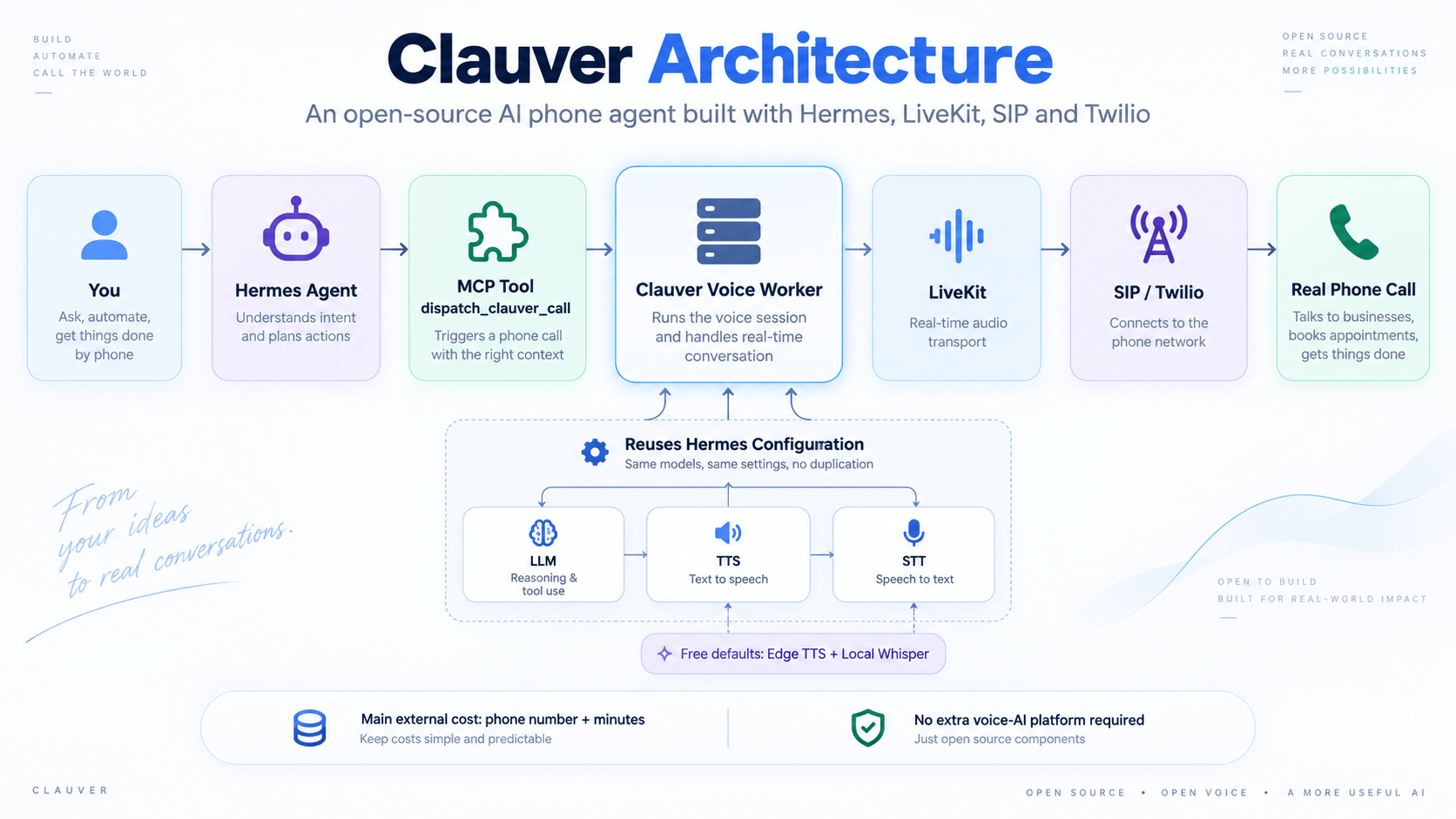
Inside the voice worker, Clauver reads the user’s existing Hermes configuration and maps it to components LiveKit can use. The same model, credentials, and speech preferences can continue to power the phone agent instead of being configured again in a separate platform.
Text-to-speech
If Hermes already has a supported TTS provider, Clauver can use it. I also built an adapter around Microsoft Edge TTS as a zero-extra-cost default, so another paid speech API is optional rather than required.
Speech-to-text
The default recognition path uses local Whisper with faster-whisper. Audio is processed on the machine running Clauver, so no separate transcription API is required. It costs less, but it is more CPU-bound than a fast streaming service such as Deepgram.
That is the pattern throughout the project: start with the cheapest practical local/default option, but don’t lock the architecture to it.
So what actually costs money?
Clauver does not make telephony magically free. Twilio over SIP still connects the internet to the telephone network, and that is the main external cost in my setup.
LiveKit handles the real-time communication layer. For development and light personal use, its builder allowance can cover a useful amount of usage, while Twilio charges for the phone connection and minutes.
The difference is that I do not need to add another dedicated conversational-AI platform just to orchestrate the LLM, speech recognition, and voice generation. I am mostly reusing infrastructure I already have.
What happens when I ask Hermes to make a call?
I wanted using Clauver to feel natural. Not a command like this:
python call.py --number ...Not twenty configuration fields. Not another dashboard. Just talk to the agent.
For example:
“Call my partner and tell them I’m running 20 minutes late.”
Hermes sees the Clauver skill and calls the MCP tool:
dispatch_clauver_call(
    phone_number,
    task,
    target_name?,
    boss?
)
From there, Clauver handles the infrastructure. The worker starts when needed, LiveKit creates the session, SIP connects the call through Twilio, and the agent begins the conversation.
The person on the other end is not hearing a prerecorded message. Clauver can listen and respond.
A sentence typed into an AI agent travelled through MCP, an LLM, TTS, LiveKit, SIP, and the public telephone network… and an actual human answered it.
Software had become my voice.
Here’s a short look at Clauver in action:
Curious enough to look under the hood?
The repository contains the MCP bridge, voice worker, and setup. If you build with Hermes, LiveKit, MCP, or voice agents, try it—and if you find a rough edge, open an issue or pull request. A star helps too.
A few things were harder than I expected
The architecture looks clean as a diagram. Reality was less polite. 😅
1. Voice pipelines are latency-sensitive
Two seconds of silence feels enormous on a phone call. LLM latency, speech recognition, TTS generation, and network latency all stack together. Local Whisper reduces external cost but increases CPU time, while Edge TTS avoids another paid provider but requires careful audio generation and conversion.
There is no universally best configuration. It is a latency, cost, and quality trade-off.
2. LLM providers behave differently
Some providers expose OpenAI-compatible endpoints. Others, such as AWS Bedrock and Anthropic, need different handling. The bridge therefore needs provider detection, API-key resolution, provider-specific logic, and sensible fallbacks.
3. Phone calls are not clean conversations
People interrupt, voicemail answers, receptionists put you on hold, and someone may ask something the agent was not prepared for. Sometimes the right thing for an AI agent to do is stop rather than invent an answer.
Safety mattered from the beginning
Voice AI becomes uncomfortable quickly if the system pretends to be human. I did not want Clauver doing that.
The current skill has a few deliberate rules:
- Clauver identifies itself as an AI assistant.
- It calls on behalf of the user rather than impersonating them.
- The user confirms before a call is placed.
- Emergency numbers are not allowed.
- The original task must be preserved without creatively changing its meaning.
That last rule matters. If you say:
“Tell them I can’t come today.”
you do not want an agent deciding that:
“Mustafa has an urgent medical emergency and will contact you tomorrow.”
sounds more professional. For an autonomous phone call, message integrity matters more than creativity.
What Clauver can do today
The current version focuses mainly on outbound calls. It can:
- Make real calls and hold short two-way conversations.
- Deliver messages, collect replies, and book appointments with alternatives.
- Detect voicemail, leave messages, and transfer to a human when appropriate.
- Log call outcomes and start the worker automatically when needed.
- Reuse Hermes LLM/TTS/STT settings.
- Run with free or local speech components by default.
Inbound calls, better structured results in Hermes, recordings, transcripts, summaries, and specialised agent modes are natural next steps.
But the important part already works:
I can type a request into Hermes and have an AI agent make a real phone call on my behalf.
That was the original problem I wanted to solve.
Why I made it open source
This project started because I temporarily could not use my own voice. It also made me think about people with permanent vocal disabilities, severe phone anxiety, temporary illness, or repetitive business calls that involve spending half the day on hold.
I do not think every phone call should be automated. I definitely do not want a future where two robots endlessly call each other about my dentist appointment. 😂
But there are situations where another way to communicate is genuinely useful. That is why Clauver is open source: you can inspect it, run it yourself, modify it, and build on top of it.
Want to try Clauver?
If you find it useful, give the repository a star. It helps other developers discover the project.
And if you know someone building with Hermes, LiveKit, MCP, or voice agents, share it with them.
Bug reports, ideas, and pull requests are welcome too.
This is becoming a pattern in how I build AI tools
Clauver is not very different from my other projects. I tend to build things when I hit a real limitation myself.
With FinMCP, AI assistants could reason about markets but did not reliably know today’s financial data. With my OpenClaw VPS experiment, I wanted to test whether AI agents really needed expensive hardware, so I ran the system on a cheap VPS and documented the bottlenecks.
Clauver follows the same idea. I needed an AI agent that could cross the gap between software and a normal telephone call, so I built the missing bridge.
That is the kind of AI infrastructure I find most interesting. Not another chatbot.
AI that can actually interact with the systems we already use.